AR Glasses Multi-Device USB-C Adapter

AR Glasses Multi-Device USB-C Adapter
Description
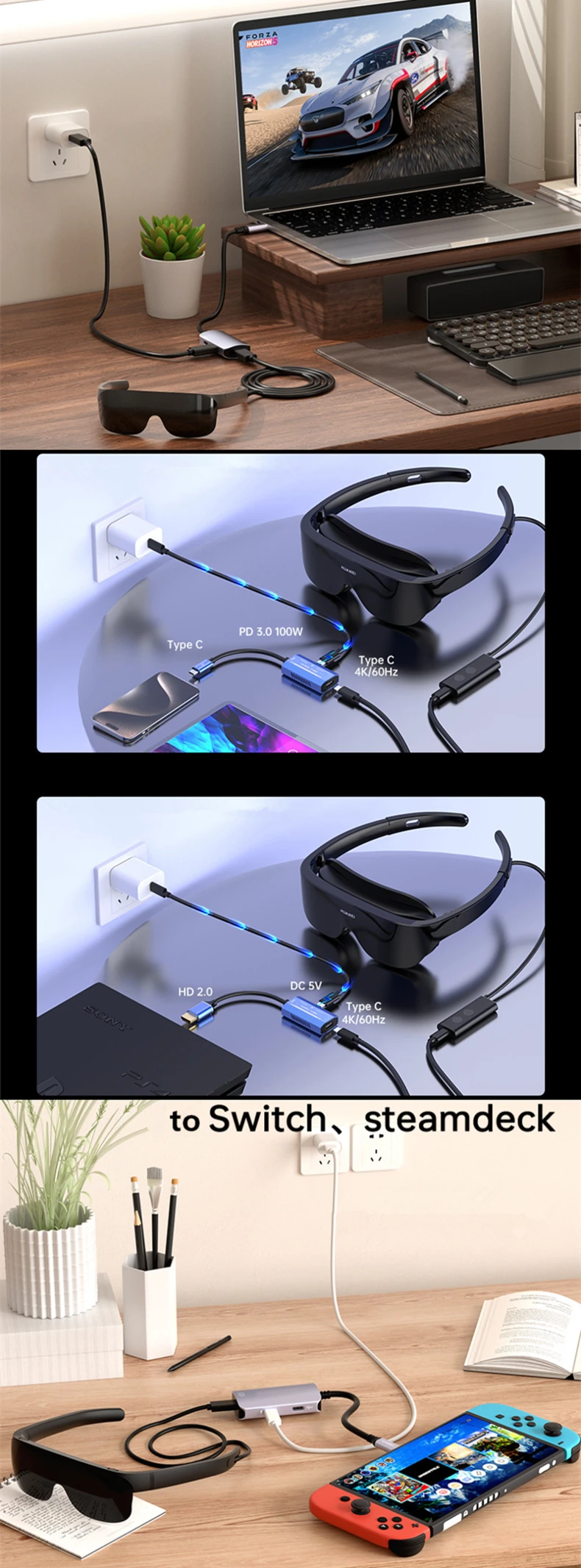
Unlock the full potential of your AR glasses with the AR Glasses HUB. Designed to maximize your device's connectivity, this compact hub allows you to connect multiple peripherals through a single Type-C port, ensuring seamless integration for your AR experience.
Features
1. Multiple Device Connectivity: Quickly expand your AR glasses' connection capabilities, most commonly you can charge and connect your smartphone in the same time, linking up to different devices via a single Type-C port.
2. Compact Design: Sleek, lightweight, and easy to carry—perfect for on-the-go professionals or casual users.
3. Plug-and-Play: No drivers or additional software required; simply plug it in, and you're good to go.
4. High-Speed Data Transfer: Enjoy fast data exchange, ensuring seamless integration for your XR experience.
5. Universal Compatibility: Tested and works with most AR glasses models that feature a Type-C port, such as Rokid/Viture/Xreal/Rayneo.
Specification
A model: Type-C male to 2pcs Type-C female, one for AR glasses, another for charging only
B model: 'A-type HDMI-compatible' male to 2pcs Type-C female, one for AR glasses, another for charging only
C model: Type-C male to 2pcs Type-C female and 1pcs USB2.0 female, one for AR glasses, another for charging only, the last one is for USB mouse/keyboard/game controller or jotstick/flash drive/Mic only when connected to PC
D model: Type-C male to 3pcs Type-C female, one for AR glasses, another for charging only, the last one is for Type-C mouse/keyboard/game controller or jotstick/flash drive/Mic only when connected to PC (USB 2.0 Protocol)
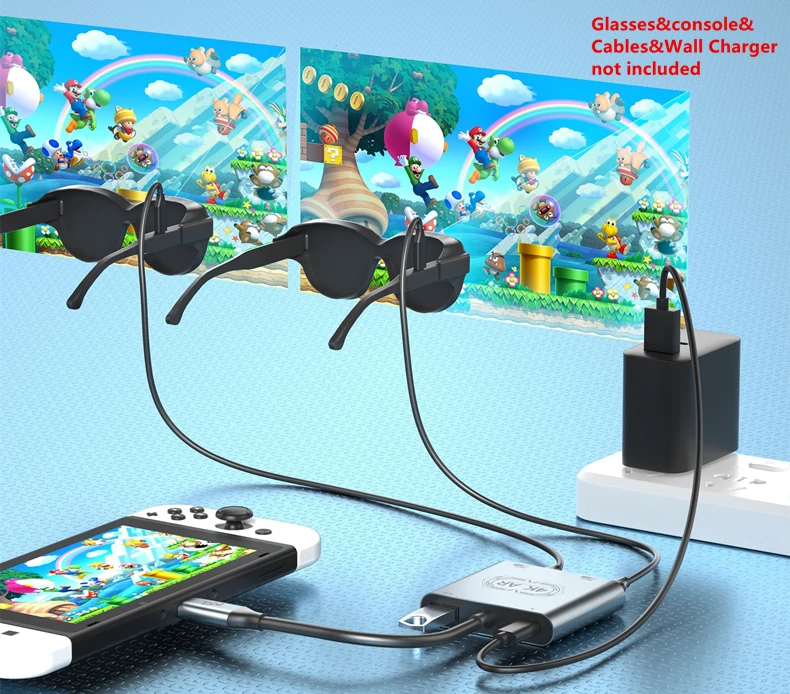
E model: this versatile hub can work with two AR glasses at the same time for both charging and display, especially for Nintendo Switch or PS5 to play together.
F model: Type-C male to 3pcs Type-C female, one for AR glasses, another for charging only, the last one is for Type-C mouse/keyboard/game controller or jotstick/flash drive/Mic only when connected to PC (USB 3.0 Protocol)
Max Display: 4K/60Hz (3840*2160)
Charging Power: PD 100W for A/B/E, PD 100W 20V 5A for C/D (not able to charge the macbooks)
Dimensions for A/B (exclude cable): about 4.5*2.4*1.2 cm / 1.77*0.94*0.47 inch
Dimensions for C/D (exclude cable): about 6*3*1.5 cm / 2.36*1.18*0.59 inch
Dimensions for E (exclude cable): about 6*5.1*1.2cm / 2.55*2*0.47 inch
Dimensions for F (exclude cable): about 7.59*3.3*1.5cm / 2.99*1.3*0.59 inch
Net Weight: 30g for A/B, 23g for C/D, 47g for E, 57g for F
Material: aluminum alloy
Replace: Xreal Hub, Viture USB-C to Glasses and Charging Adapter / USB-C XR Charging Adapter For USB-C i-Phones, Rokid Hub, Rayneo HDM1-C to AR Glasses with Charging Port Adapter
Options A/B/C/D/E support Switch & Switch Lite only; Option F supports Switch, Switch Lite, Switch OLED, and Switch 2.
Suitable for
Xreal One Pro, Xreal One, Beam Pro, Beam (Not compatible with Xreal 1s)
*Note: It needs to hold pressing QUICK BUTTON to swich the sound from computer to AR glasses if no sound from glasses when connected. When connected Macbook, it might adjust the DP mode in the glasses, and select 'One' in both 'Sound-Play sound effects through' and 'Output' in system setting.
Please note: C&D types do not support Macbook to transfer the audio to the earphone of the Xreal series, C&D do not support to transfer the audio of smartphone&tablet pad to Air2 and Air2 Pro either, we recommend A type for Air2&Air2 Pro.
Rokid Max 2, Max, Station2, Station
*Note: when connected to Macbook, it might press the pop-up button to allow to connect, otherwise select 'Rokid' in both 'Sound-Play sound effects through' and 'Output' in system setting.
Rayneo Air 3, Air 2s, Air2, JoyDock for NintendoSwitch, Pocket TV/Streaming Media Box (Not compatible with Rayneo Air 4 Pro)
*Note: When connected to Macbook, it might press the pop-up button to allow to connect, otherwise select 'Smartglass' in both 'Sound-Play sound effects through' and 'Output' in system setting. For A model, it must connect the charging cable to work, not support to charging the Macbook through these hub either.
Viture One Lite, Viture Pro Neckbank, Viture Pro Mobile Dock (Not compatible with Viture Luma and Beast series)
Fit to Windows10/11 and mac computers, most of smartphones which type-C port supports DP output (refer to AR glasses' official website for sure)
Note: For B model, it has to charge to work.
Package Includes
1 X AR Glasses HUB
2 X Sponge Cover for Nose Pads to avoid facial oil touching